
How to Centralize WhatsApp, Instagram & Messenger in One Inbox
Stop juggling multiple apps. Learn how to manage WhatsApp, Instagram DMs, and Facebook Messenger from a single, unified inbox—and never miss a customer message again.
How to Centralize WhatsApp, Instagram & Messenger in One Inbox
Your customer just messaged you on WhatsApp. Another one is waiting in Instagram DMs. A third left a message on Facebook Messenger—while your team is scrambling between three different apps, on three different phones, trying to figure out who already replied.
Sound familiar?
This is the reality for most businesses today. Customers don’t care which channel they use—they just want a fast answer. But managing multiple messaging apps simultaneously is a nightmare that slows down your team, creates duplicate replies, and lets messages fall through the cracks.
The solution: a unified inbox that brings every conversation into one place.
In this tutorial, we’ll show you exactly how to set up a centralized inbox with EZContact, covering WhatsApp Business API, Instagram Direct Messages, and Facebook Messenger—all in a single, organized panel.
Why a Unified Inbox Matters
Before diving into the how, let’s look at the numbers:
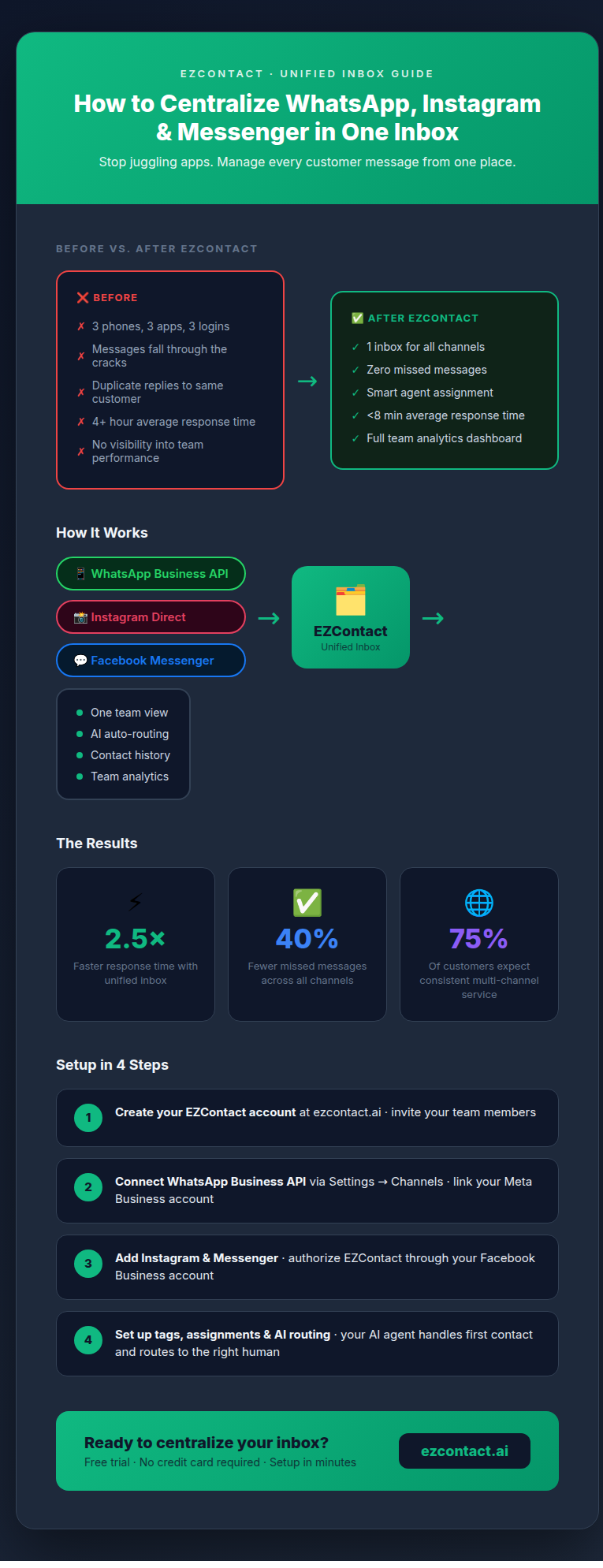
- 75% of customers expect consistent service across all channels (Salesforce, 2025)
- Businesses using unified messaging see 40% fewer missed messages
- Teams respond 2.5x faster when they don’t have to switch between apps
- 68% of customers have abandoned a purchase because they didn’t get a timely response
The problem isn’t that your team isn’t working hard enough—it’s that fragmented tools make it nearly impossible to stay on top of every conversation.
What Is a Multichannel Inbox?
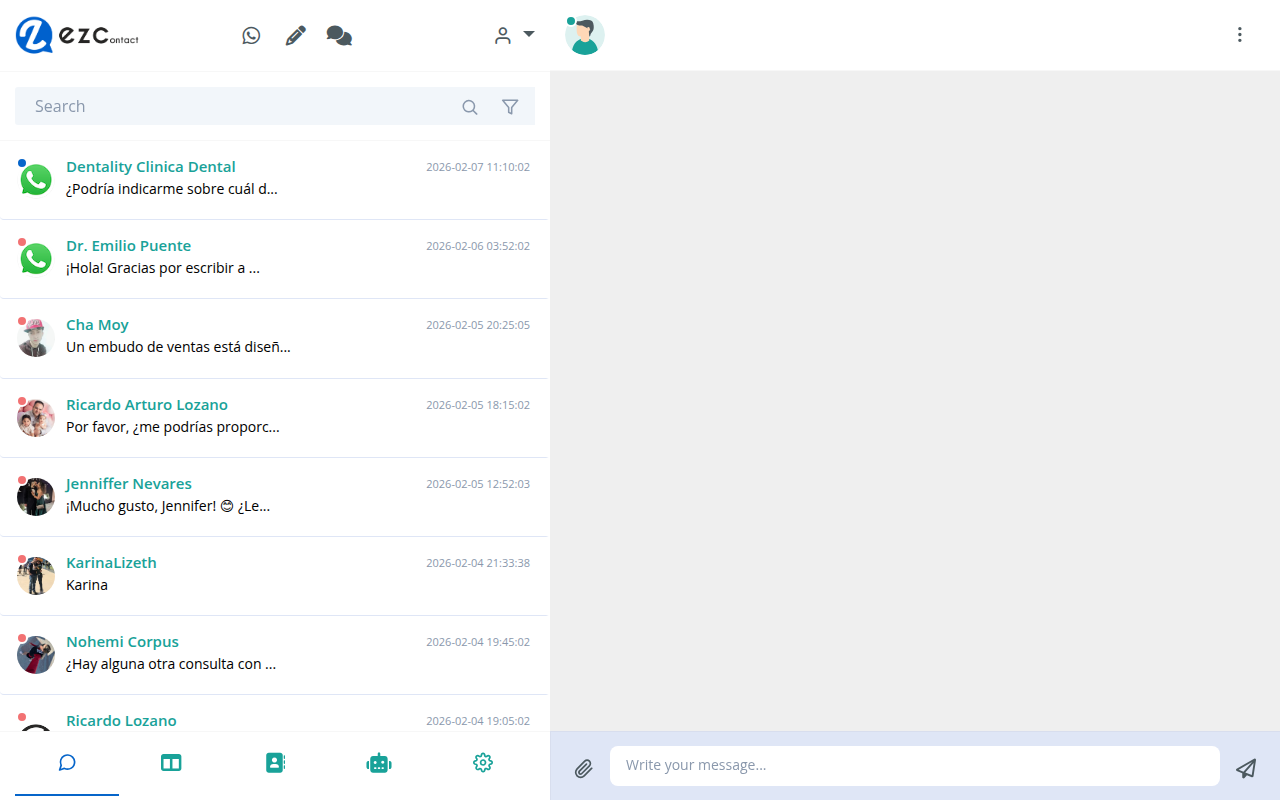
A multichannel inbox (also called omnichannel inbox) is a single platform that aggregates conversations from multiple messaging channels into one unified view.
Instead of logging into WhatsApp Business, then switching to Instagram, then checking Facebook Messenger, your agents see all messages from all channels in one feed—with full context, contact history, and collaboration tools.
With EZContact, your unified inbox includes:
| Channel | What you can do |
|---|---|
| WhatsApp Business API | Send/receive messages, templates, media, voice notes |
| Instagram Direct | Manage DMs, stories replies, and mentions |
| Facebook Messenger | Reply to page messages and comments |
Step-by-Step: Setting Up Your Unified Inbox in EZContact
Step 1: Create Your EZContact Account
Head to ezcontact.ai and sign up for your account. EZContact is a Meta Business Partner, which means connecting WhatsApp, Instagram, and Messenger is streamlined and officially supported.
During setup, you’ll create your workspace and invite your team members. Each agent gets their own login, and you can control which conversations they can see and manage.
Step 2: Connect WhatsApp Business API
WhatsApp is where most of your customer conversations happen, so we’ll start here.
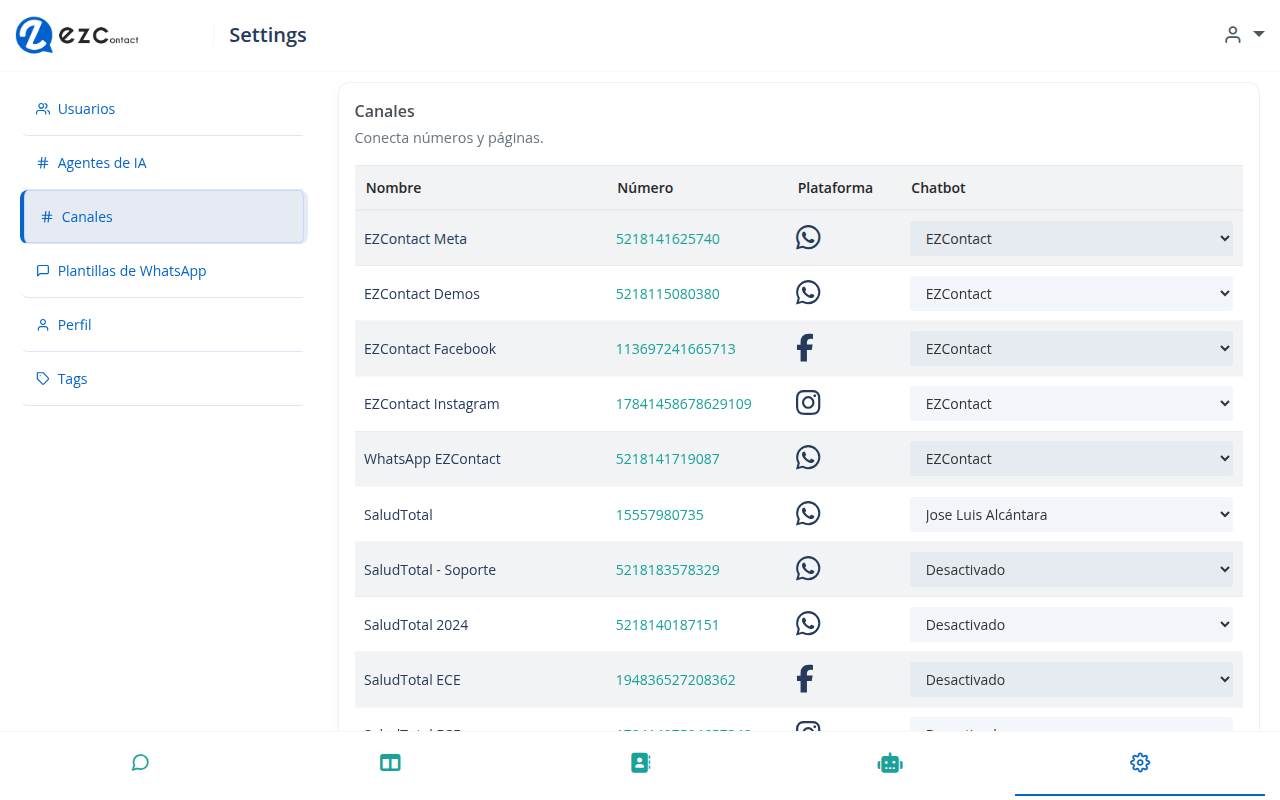
- In EZContact, go to Settings → Channels
- Click “Add Channel” and select WhatsApp
- Connect your Meta Business account (you’ll need admin access)
- Select your WhatsApp Business phone number (or create a new one)
- Complete the verification process
Important: EZContact uses the official WhatsApp Business API, not the regular WhatsApp app. This means you get verified green checkmarks, message templates, and no restrictions on conversation volume.
Once connected, your WhatsApp conversations will immediately start appearing in your inbox.
Step 3: Connect Instagram Direct Messages
- Go to Settings → Channels → Add Channel
- Select Instagram
- Log in with your Facebook account (Instagram is managed through Meta)
- Select the Instagram Business account you want to connect
- Grant the necessary permissions
Tip: Make sure your Instagram account is a Business or Creator account (not a personal account) and connected to a Facebook Page. This is required by Meta’s API.
After connecting, all new Instagram DMs will flow into your EZContact inbox alongside your WhatsApp messages.
Step 4: Connect Facebook Messenger
- Go to Settings → Channels → Add Channel
- Select Messenger
- Choose your Facebook Page from the list
- Authorize EZContact to manage messages
Within seconds, all new Messenger conversations will appear in the same unified inbox. Your team will never have to log into Facebook Business Suite just to reply to a message again.
Step 5: Organize with Tags and Assignments
Now that all channels are connected, it’s time to set up your workflow:
Create tags for quick categorization:
- 🛒
Sales Lead— for purchase inquiries - 🔧
Support— for technical issues - 📅
Appointment— for scheduling requests - ⭐
VIP Customer— for priority accounts
Assign conversations to specific agents based on specialty. A sales question from Instagram can go directly to your sales rep, while a support issue from WhatsApp goes to your technical team—automatically.
Set up your AI agent to handle the initial qualification. EZContact’s AI agent reads the incoming message, identifies the customer’s intent (buying, asking for support, requesting information), and either resolves it or routes it to the right human agent.
Step 6: Use Filters to Stay Organized
With all channels flowing into one inbox, you’ll want to use filters to keep things manageable:
- Filter by channel: See only WhatsApp, only Instagram, or only Messenger conversations
- Filter by status: Open, pending, or resolved
- Filter by agent: What’s assigned to you vs. your team
- Filter by tag: See all “Sales Lead” conversations at once
This is especially powerful for team leaders who need a bird’s-eye view of all ongoing conversations without getting lost in individual threads.
The Power of Context: One Customer, All Channels
Here’s something that makes EZContact’s unified inbox truly different: contact deduplication.
If a customer messages you on WhatsApp today, then follows up on Instagram a week later, EZContact links those conversations to the same contact profile. Your agent can see the full history—what was discussed, what was resolved, and any notes left by previous agents.
No more “I already explained this to someone else.” No more customers repeating themselves. The full context travels with the contact, regardless of which channel they use.
Real Example: How a Retail Brand Manages 300+ Daily Messages
A clothing boutique was juggling WhatsApp (their main sales channel), Instagram DMs (where customers asked about new arrivals), and Facebook Messenger (where older customers preferred to shop).
Before EZContact:
- 3 separate phones managed by different staff members
- Messages regularly missed or duplicated
- Average response time: 4+ hours
- No visibility into team performance
After centralizing with EZContact:
- One inbox, one team, full visibility
- AI agent handles sizing questions and availability checks automatically
- Average response time dropped to under 8 minutes
- Sales conversion from chat increased by 35%
Frequently Asked Questions
Can I assign different agents to different channels? Yes. You can route WhatsApp conversations to your sales team, Instagram DMs to your social media manager, and Messenger inquiries to your support team—all automatically based on rules you define.
Does EZContact work with WhatsApp without the Business API? No. EZContact requires the WhatsApp Business API, which is the only way to manage WhatsApp at scale without using a personal phone. The API gives you features like templates, automation, and multi-agent support that the regular app doesn’t offer.
Can my AI agent work across all channels? Yes. EZContact’s AI agent works across WhatsApp, Instagram, and Messenger simultaneously. It understands the context of each conversation and responds naturally—not with pre-written scripts.
What happens to old conversations when I connect a channel? New conversations start flowing in immediately. Historical messages from before the connection are typically not imported, but going forward, all new messages are captured.
Ready to Stop Juggling Apps?
Managing three separate messaging apps is slowing your team down and costing you customers. A unified inbox isn’t a luxury—it’s a fundamental tool for any business that takes customer service seriously.
EZContact brings WhatsApp Business API, Instagram, and Facebook Messenger into one clean, organized inbox—with an AI agent that handles the first touch, team collaboration tools, and the analytics you need to keep improving.
👉 Start your free trial at ezcontact.ai
No technical setup required. You can have all three channels connected and your team onboarded in less than an hour.
EZContact is an official Meta Business Partner. WhatsApp Business API, Instagram, and Facebook Messenger integrations are fully supported and compliant with Meta’s policies.